


Setting up a subdomain redirect can be harder than it looks. I recently needed to redirect a subdomain to a page on the main domain in Spaceship web hosting, and what I expected to be a quick job turned into a troubleshooting session with customer support. This is what happened and what I learned.
The problem: the subdomain was already connected to hosting
I contacted Spaceship’s live support for help with the redirect. The agent, Abhijith, replied quickly and walked me through the steps:
- Go to the Advanced DNS section (Spaceship Advanced DNS).
- Select the main domain, in this case seodigitalproducts.com.
- Open the “URL Redirect” section in the menu.
- Set up the redirect for the subdomain.
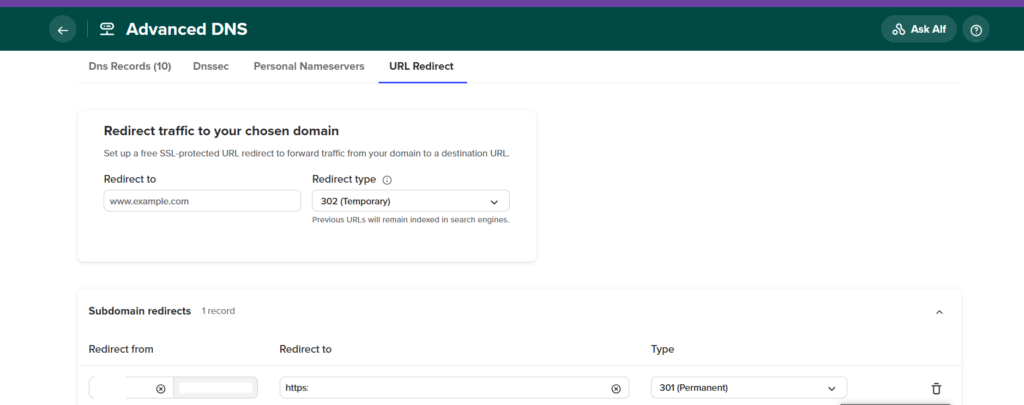
It all looked simple until an error message said the subdomain was already connected to my hosting plan, so the redirect couldn’t be applied.
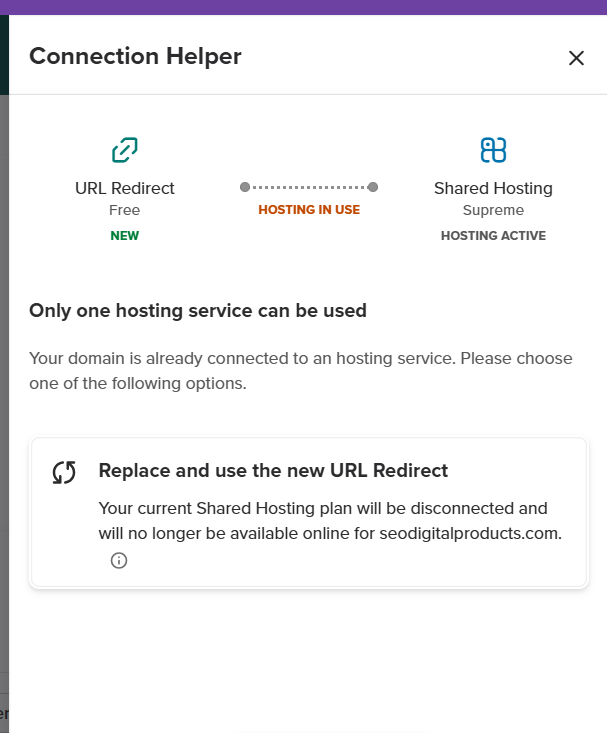
The fix: remove the subdomain from hosting
The agent spotted the problem straight away. The subdomain store.seodigitalproducts.com was linked to my hosting plan, and that was blocking the redirect. The fix was to remove the subdomain from the hosting plan first, then set up the redirect.
After I made that change, I set up the redirect again. When I tested it, it still didn’t work.
Waiting for DNS to propagate
Abhijith explained that DNS changes can take up to 30 minutes to fully propagate. He could already see the redirect working from his side, but it hadn’t updated for me yet. He suggested:
- trying a different browser or a private window to skip cached data
- waiting for local internet providers to update their DNS caches, which can take longer
After a short wait, the redirect started working.
What I learned
- Before you set up a subdomain redirect in Spaceship web hosting, check whether the subdomain is linked to your hosting plan. If it is, remove it first.
- DNS propagation takes time, usually around 30 minutes, and sometimes longer depending on your internet provider.
- If the redirect doesn’t work straight away, clear your cache, open a private window or test on another device.
- Live support can save you a lot of time. Spaceship’s team replied quickly and solved the problem.
Related guides:
