A practice owner sent me his lead sheet and a simple question: why does Bing say we got 36 leads when my team only counted 19, from every source combined?
He was right to ask. The client is a medical practice with multiple locations in the US, and I look after their SEO. I’m primarily an SEO, but I also have a solid background in ads management, so I’m sometimes called in to help with difficult ad problems. I don’t manage their ads, but when the numbers didn’t add up, I made an exception and took a look at their Microsoft (Bing) Ads account.
The two are more connected than they look. The tracking that tells you whether an ad brings in patients is the same tracking that tells you whether SEO does. If it counts the wrong thing, both channels look better or worse than they are.
The ads looked like they were working. The front desk didn’t feel it.
This is the build log of what I found and what I changed in one evening. The short version: the dashboards were counting the wrong thing, and nobody could tell which channel a patient came from.
The short version, for business owners
If you run ads or pay for marketing, here is the one thing to take from this post.
Your dashboard can count a lead when nobody filled in anything.
Most ad platforms and Google Analytics let you define a “conversion” in a few clicks. The quickest setup is “count it when someone visits the booking page”. It feels sensible. But a visit is not a booking. People open the page, look at the form and leave. Every one of those visits was being counted as a lead.
Here is what I found:
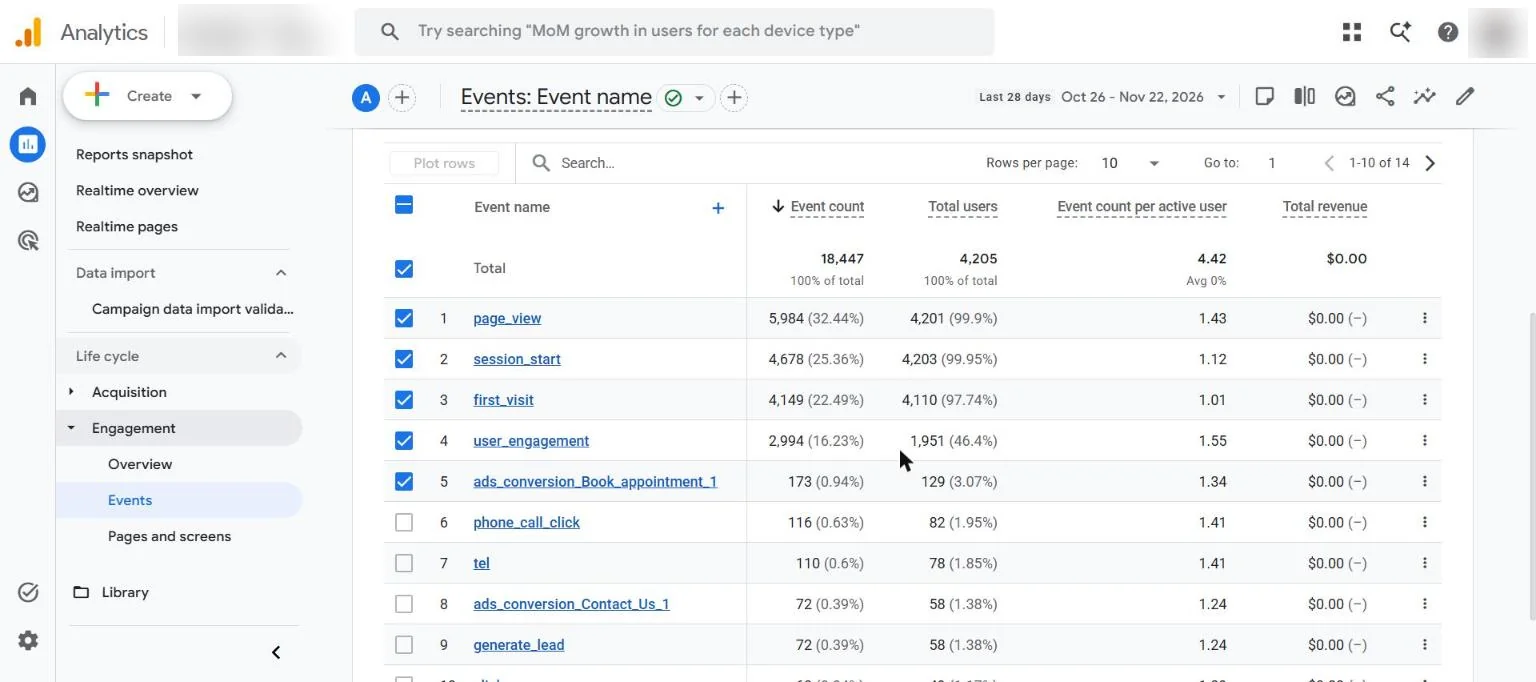
- Google Analytics counted 173 “Book appointment” leads in 28 days. The front desk’s sheet, covering every source, had 19. Every visit to the booking page counted as a lead, whether or not a form was sent.
- “Contact us” leads were the same. Every visit to the contact page counted as a lead.
- One “success” goal was a page view of a patient story. Someone set it up once and it stayed.
- The booking form sits inside the website but runs on the practice’s CRM. So the website never knew when it was actually sent.
- The lead sheet had no “source” column. Even the real leads couldn’t be traced back to Google, Bing, the Google Business Profile or anywhere else.
So the practice was making budget decisions on numbers that were partly page views, and they had no way to see which channel brought real patients.
If any of that sounds familiar, ask whoever runs your ads one question: “Does our conversion count go up when someone visits a page, or only when they actually send a form or call?” If they’re not sure, neither are your numbers.
What we changed
The goal was simple. Count a lead only when a form is actually sent, and label every lead with where the person came from.
1. Count sent forms, not page visits
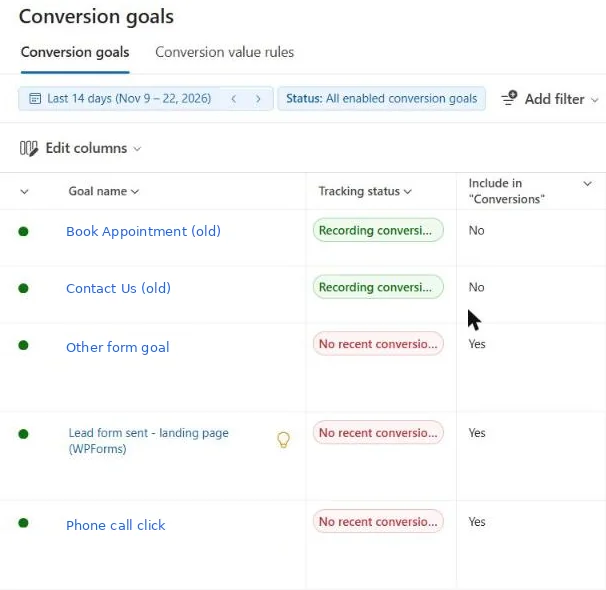
- Bing: I set up a new conversion that fires only when the landing page form is successfully sent. The two old page-visit goals still record data, but they no longer count as conversions.
- The CRM booking form: after someone sends it, it now opens the website’s thank-you page instead of showing a message inside the form. That gives the website a clear signal that a real request went through.
- Google Analytics: a new “lead form sent” event fires only on a real send, for both forms.
2. Label every lead with its source
Every visitor now gets a source label when they arrive on the site:
- Google Ads
- Bing Ads
- Google Business Profile (one label per location)
- Google search
- Bing search
- TikTok
- Facebook or Instagram
- Another website, named
- Direct
When they send a form, that label goes with the lead.
One rule matters a lot here. If someone clicks an ad and comes back three days later by typing the address, the lead still belongs to the ad. Paid clicks keep their label for 30 days. Without that rule, ads look worse than they are, because a lot of people click, think about it, and come back later.
3. Tag the Google Business Profile booking button
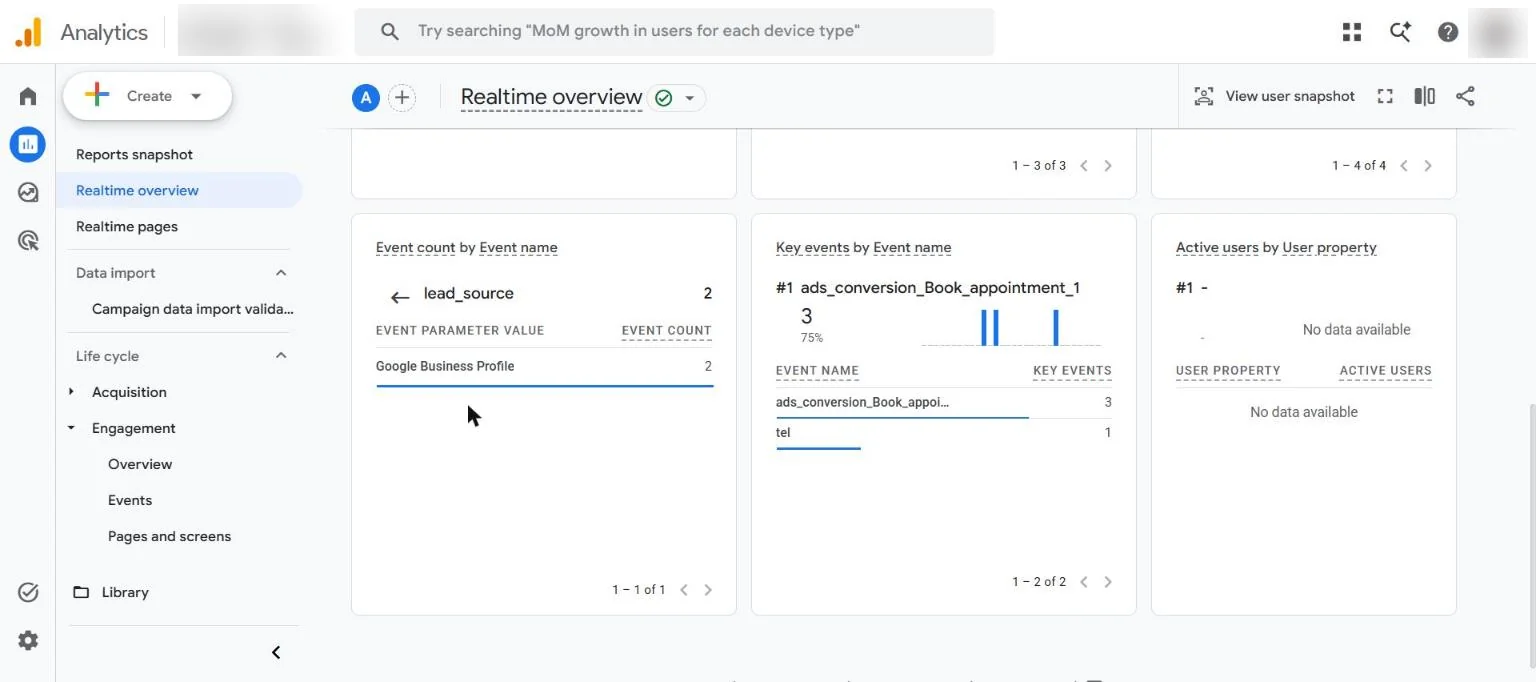
The website link on each Business Profile was already tagged, so those visits showed up correctly. The booking button wasn’t. People who tapped “Book” on Google Maps showed up as “direct” traffic, and the profile got no credit. One small change to the link fixed it.
4. Send ad traffic to a page built to convert
Part of the leak was where the ads pointed. More than half the Bing spend went to the homepage, which had a pop-up with its own booking button and a full menu of ways to wander off. Both campaigns now go to a dedicated landing page with the enquiry form at the top and no menu.
For the technical crowd
If you do this kind of work, here are the parts that took the most thought.
Find out what your conversions really are. The GA4 “conversions” here had been created from the Google Ads interface as page-view rules. You can’t see the rules in the GA4 events list, only the event names. I read them out of the Google tag config the site loads. Each ads_conversion_* event was page_view plus a page_path condition. If a GA4 key event has a suspiciously round business-sounding name, check its definition.
Embedded CRM forms are blind spots. The booking form is an iframe from a third-party CRM. The parent page can’t see inside it, and the iframe can’t see the parent page’s tags. The cleanest fix is the CRM’s own setting: redirect to a thank-you page on your domain after sending, then fire your events there. I added a guard so that if the redirect opens inside the iframe, the script moves it to the full page.
Label once, store it first-party. One small script in the site footer reads utm_* tags, click IDs (gclid, msclkid, ttclid) and the referrer, and stores a readable label in a 30-day first-party cookie. Paid labels can’t be overwritten by a later organic or direct visit. The same label fills a hidden field on the WordPress form and goes out as a parameter on the GA4 event:
// simplified
if (params.get('gclid')) save('Google Ads', {paid: true});
else if (params.get('msclkid')) save('Bing Ads', {paid: true});
else if (utmSource.startsWith('gmb')) save('Google Business Profile');
else if (/google\./.test(referrer)) save('Google search');
// ...
gtag('event', 'lead_form_sent', { form_name, lead_source, page_path });
Watch your tags’ history hooks. Microsoft’s UET tag here has enableAutoSpaTracking on. It hooks history.replaceState, so changing the URL from a script can log an extra page view. If you have to touch the address bar, check first.
Don’t delete what someone else may be bidding on. I left the old page-view events in GA4 alone, because Google Ads (run separately) may be importing them for bidding. The fix there is switching Google Ads to the new event, which is a conversation with whoever runs that account.
What isn’t fixed yet
Being honest about the gaps:
- The CRM form’s own “source” field stays empty. The label reaches the embedded form correctly, but the CRM doesn’t save it on send. Google Analytics has the source for every lead. The CRM record and the practice’s notification email don’t yet, for that one form. That one is with the CRM provider.
- Phone calls are only partly traced. A tracking number on the Bing landing page will tell us which calls came from Bing. Other calls show up as taps on the phone number, and Google Business Profile shows its own call count.
- No results yet. The tracking went live the day I wrote this. I’ll update this post in January with six weeks of real numbers: leads by source and cost per lead from ads.
The takeaway
More traffic doesn’t help if you can’t tell which channel brings patients. Before you add budget, make sure your numbers count real enquiries and say where each one came from. Most of the fixes here took an evening, not a rebuild.
Lead tracking like this is part of my local SEO work. For a small business, even a WhatsApp link with a different opening message for each channel shows you where enquiries come from. And if your pages get seen but not clicked, my free Search Console audit shows which ones.
If you’re not sure your lead numbers mean what you think they mean, get in touch. I’ll tell you what your dashboard is actually counting.